

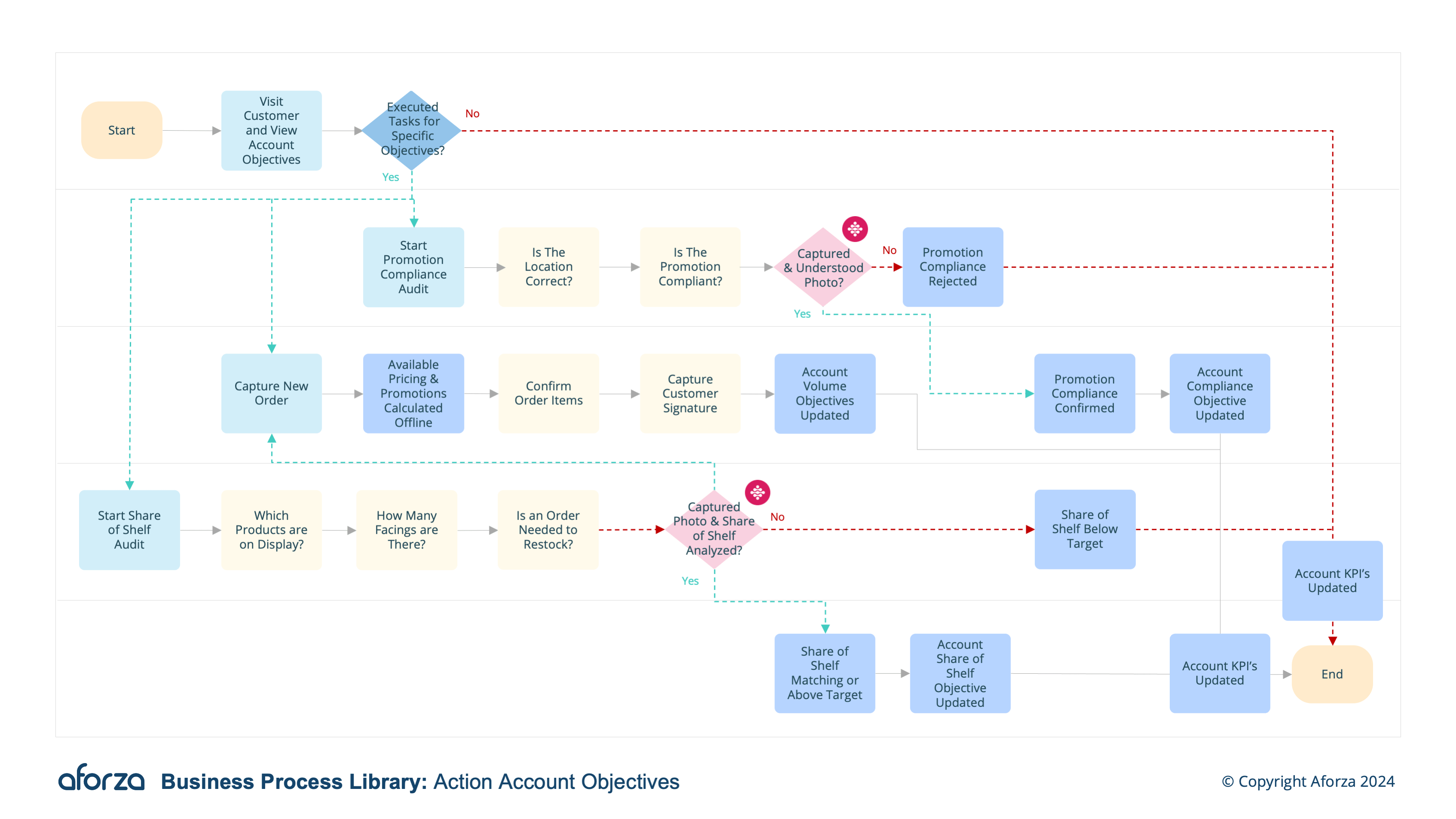
Business Process Overview
- Define annual account objectives with management: Establish clear yearly goals in collaboration with management.
- View the annual account objective on mobile: Access the defined objectives on a mobile device for easy reference.
- Execute tasks that contribute to meeting objectives: Carry out specific tasks that align with the set objectives.
- Track progress against objectives on mobile device: Monitor progress in real-time to ensure objectives are on track.
- Reward based on objective performance: Provide incentives and rewards based on the achievement of objectives.
Supported Languages: 🇬🇧 🇵🇹
This involves creating a new account with essential details, capturing geolocation for future visit accuracy, assigning initial attributes to gauge the prospect’s potential, and scheduling an initial follow-up visit. The process concludes with syncing all the captured data to headquarters for tracking and further qualification. This structured approach ensures that no prospect details are missed, improving the accuracy of future interactions and optimizing the sales pipeline.

1. Define Annual Account Objectives With Management
This step involves setting clear, measurable goals for the year in collaboration with management.
- Meet with management to discuss and agree on annual objectives.
- Define specific, measurable, achievable, relevant, and time-bound (SMART) goals.
- Ensure objectives align with overall company strategy and account needs.
- Add the agreed objectives to the system for tracking.
- Communicate the objectives to relevant team members.

2. View the Annual Account Objective on Mobile
This step allows field users to easily access their objectives on mobile devices.
- Log into the mobile application.
- Navigate to the objectives section.
- View the detailed list of annual objectives.
- Check for any updates or changes in the objectives.
- Ensure objectives are clearly understood and prioritized.

3.Execute Tasks That Contribute to Meeting Objectives
This step involves performing specific tasks that help achieve the set objectives.
- Identify tasks that align with each objective.
- Prioritize tasks based on their impact on the objectives.
- Complete tasks efficiently and effectively.
- Record task completion and any relevant details.
- Report progress to management as needed.

4. Track Progress Against Objectives on Mobile Device
This step allows for real-time monitoring of progress towards the objectives.
- Access the tracking feature in the mobile application.
- Update progress regularly.
- Review progress reports and identify any gaps.
- Adjust strategies and tasks as needed to stay on track.
- Communicate progress updates to management.

5. Reward Based on Objective Performance
This step involves recognizing and rewarding field users based on their performance against the objectives.
-
Evaluate performance at regular intervals.
-
Identify individuals or teams that have met or exceeded objectives.
-
Determine appropriate rewards or incentives.
-
Communicate rewards and provide recognition.
-
Document and share best practices to encourage continued performance.
Get Started Today
Click here to download the process flow and supporting guide. This download includes the flow that can be installed as an Aforza Guided process, along with all supporting materials to ensure successful implementation and adherence to best practices.