

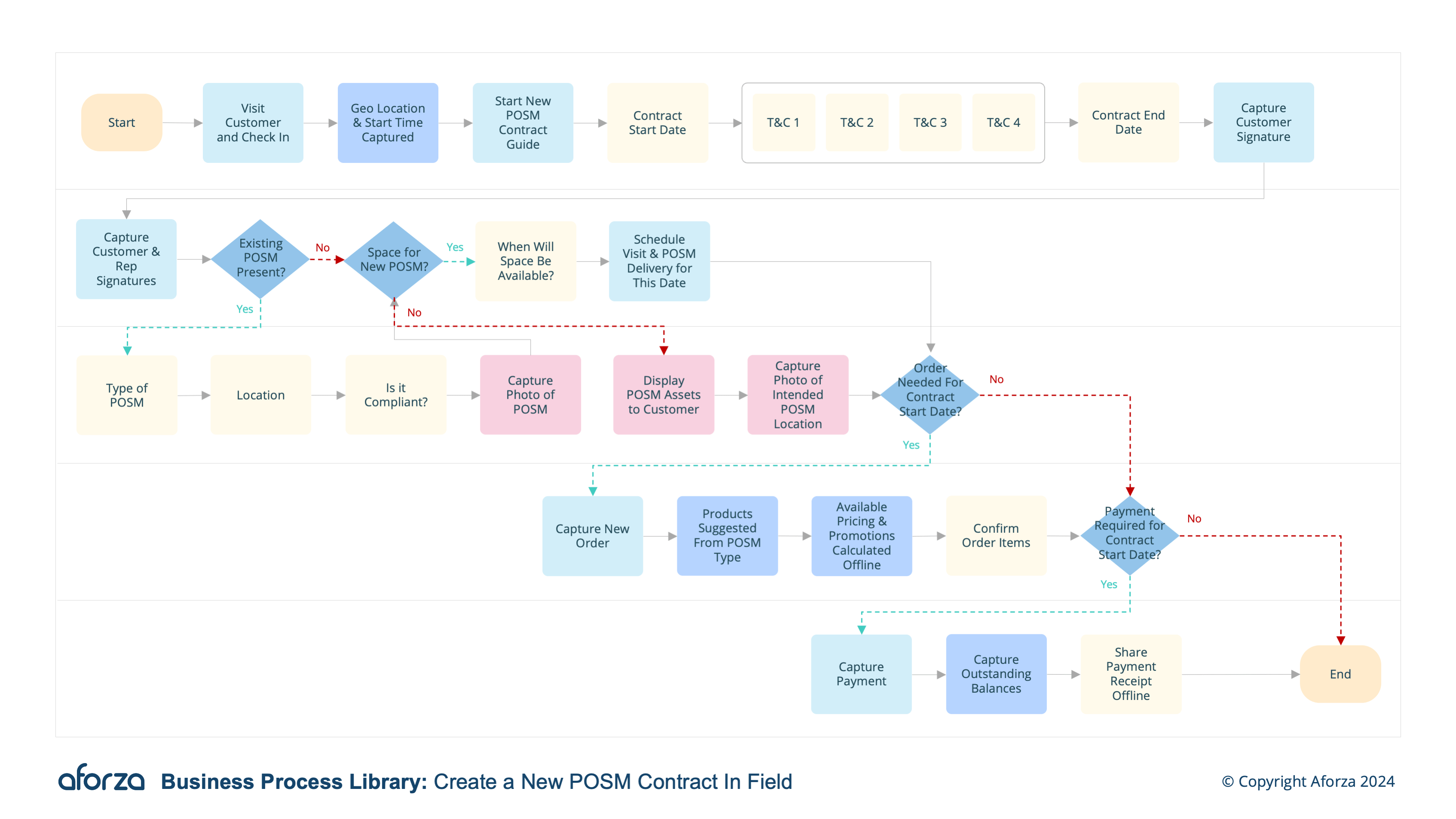
Business Process Overview
- Check into visit and confirm location: Verify the field user’s presence at the correct location and with the correct decision maker.
- Review existing contracts: Check status, terms, and expiration dates of any existing contracts with the customer.
- Draft new contract: Enter contract details including specific terms, conditions, pricing, products and duration.
- Capture related images: include photos to the contract to assist with contact conditions such as merchandise location, or shelf space.
- Obtain customer signature: Ensure the customer reviews and signs the contract digitally and complete the contract.
Supported Languages: 🇬🇧 🇵🇹 🇭🇷 🇦🇪
This process involves verifying the presence at the correct location, reviewing existing contracts, drafting new contract details, capturing related images, and obtaining the customer’s digital signature. This ensures that all contractual elements are accurately documented and agreed upon. Key insights include understanding the customer’s current agreements, tailoring the new contract to meet both parties’ needs, and securing a legally binding agreement.

1. Check Into Visit & Confirm Location
This step verifies the field user’s presence at the correct location and with the correct decision maker.
- Check-in to the visit using the mobile device.
- Confirm the GPS location to ensure accuracy.
- Verify the presence of the appropriate decision maker.
- Document the time and date of the visit.
- Ensure all preliminary information is accurately recorded.

2. Review Existing Contracts
This step checks the status, terms, and expiration dates of any existing contracts with the customer.
- Access the customer’s contract history.
- Review current contract status.
- Note any upcoming expiration dates.
- Understand existing terms and conditions.
- Identify opportunities for renewal or renegotiation.

3. Draft New Contracts
This step involves entering contract details including specific terms, conditions, pricing, products, and duration.
- Input customer-specific terms and conditions.
- Specify the product list and pricing.
- Determine the contract duration.
- Include any special conditions or agreements.
- Review all details for accuracy.

4. Capture Related Images
This step includes taking photos to assist with contract conditions such as merchandise location or shelf space.
- Take clear photos of the merchandise location.
- Ensure images capture all relevant details.
- Attach photos to the contract document.
- Label images appropriately for clarity.
- Verify that all visual documentation is accurate and complete.

5. Obtain Customer Signature
This step ensures the customer reviews and signs the contract digitally and completes the contract.
- Present the contract to the customer for review.
- Highlight key terms and conditions.
- Guide the customer through the digital signature process.
- Confirm the contract is signed and dated.
- Sync the signed contract with headquarters for processing.
Get Started Today
Click here to download the process flow and supporting guide. This download includes the flow that can be installed as an Aforza Guided process, along with all supporting materials to ensure successful implementation and adherence to best practices.