

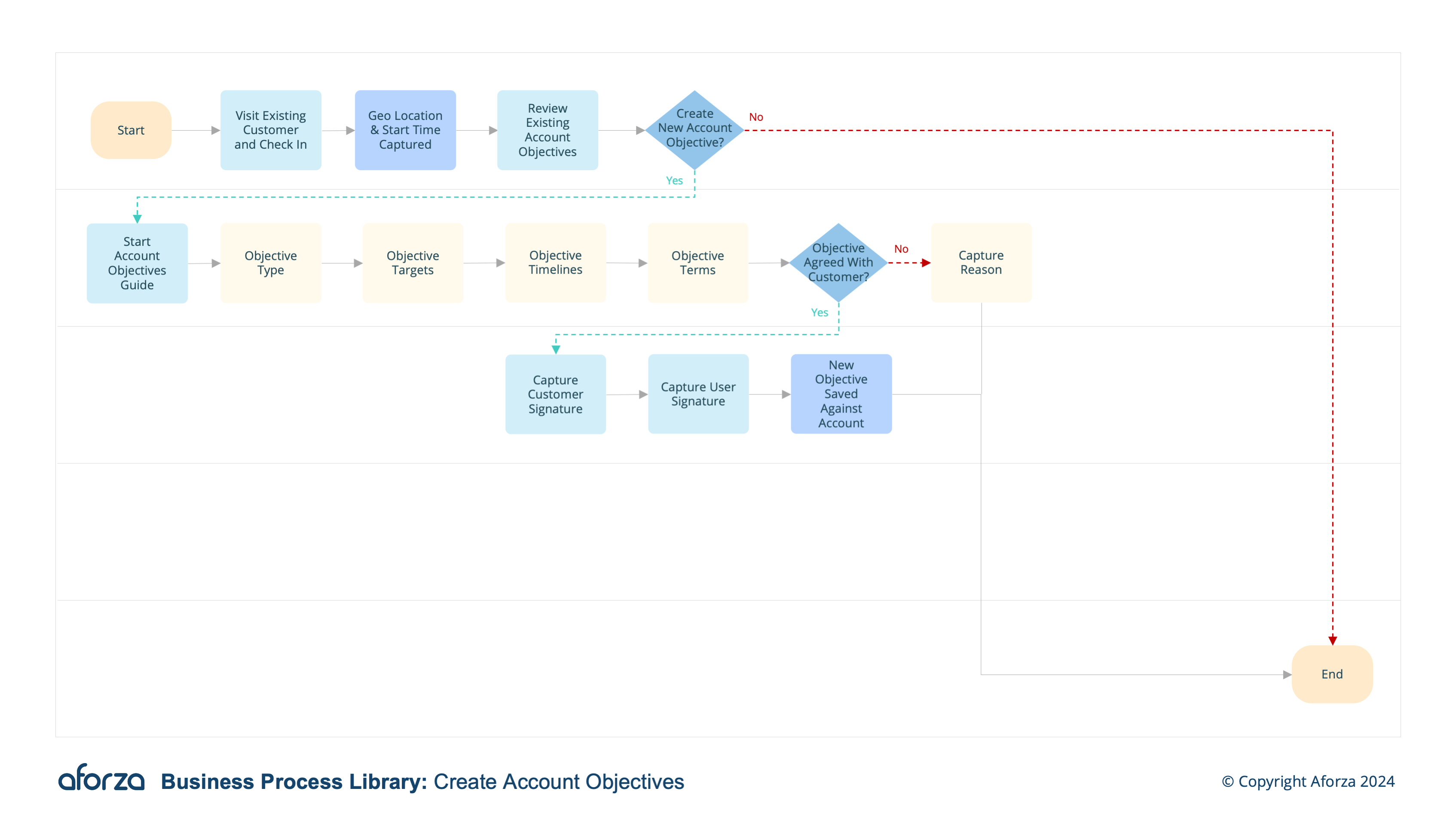
Business Process Overview
- Check into visit and confirm location: Verify the field user’s presence at the correct location.
- Review existing Account Objectives: check existing objectives, their status, timelines and type.
- Start Create Objectives Guide: Follow guided process to create new Account Objectives.
- Create New Objective: Chose the terms, Timelines, Types and Targets.
- Authorise Objective: Capture Customer signature with agreement for the new Objectives
Supported Languages: 🇬🇧 🇵🇹 🇭🇷
This process is crucial for aligning business strategies with customer expectations and driving performance. By verifying the user’s location, reviewing existing objectives, and guiding them through the creation of new objectives, this process ensures comprehensive and effective goal setting. The final step involves obtaining customer authorization, solidifying the agreement and commitment to the newly defined objectives.

1. Check Into Visit and Confirm Location
This step ensures that the field user is at the correct location before starting the objective creation process.
- Log into the mobile application.
- Confirm the visit location via geolocation.
- Verify presence at the specified customer site.
- Start the visit timer for tracking duration.
- Confirm the correct decision-maker or contact at the site.

2. Review Existing Account Objectives
This step involves assessing current objectives to understand the baseline and identify gaps.
- Access existing account objectives in the application.
- Check the status of each objective (completed, in-progress, etc.).
- Review timelines associated with each objective.
- Note the type and scope of current objectives.
- Identify areas needing new or updated objectives.

3. Start Create Objectives Guide
This step initiates the guided process to systematically create new account objectives.
- Access the “Create Objectives Guide” in the application.
- Follow the prompts to ensure all necessary information is captured.
- Adjust the guide based on real-time inputs and customer feedback.
- Capture preliminary ideas and align them with business strategies.
- Ensure all required fields are addressed in the guide.

4. Create New Objective
This step involves defining the specifics of the new account objectives.
- Choose terms that clearly define the objective.
- Set realistic and measurable timelines.
- Determine the types of objectives (e.g., sales targets, promotional goals).
- Establish specific targets to be achieved.
- Ensure the objectives are aligned with both company and customer goals.

5. Authorize Objective
This step finalizes the objective creation process by obtaining customer agreement.
- Review the new objectives with the customer.
- Capture the customer’s digital signature for authorization.
- Ensure the customer understands and agrees to the terms and targets.
- Save the authorized objectives in the system.
- Sync the new objectives to HQ for tracking and follow-up.
Get Started Today
Click here to download the process flow and supporting guide. This download includes the flow that can be installed as an Aforza Guided process, along with all supporting materials to ensure successful implementation and adherence to best practices.