

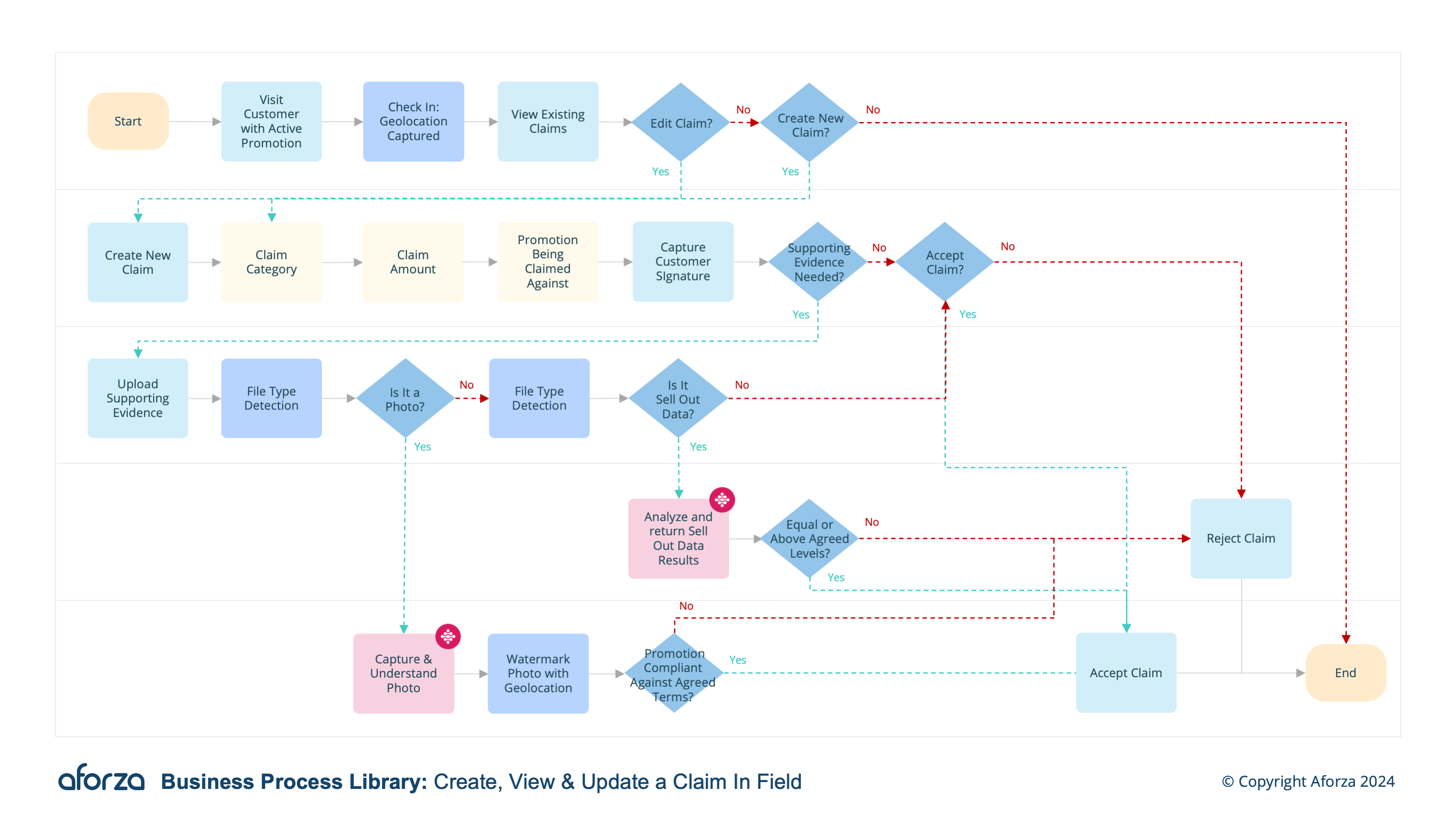
Business Process Overview
- Visit customer with ongoing promotion expecting to be paid for compliance.
- View existing claims: Review status, amount, created date and promotion.
- Edit claims: Edit any details of the claim or upload supporting evidence (sell out data, compliance photos etc)
- Create new claim: Create a new claim for the customer, adding correct details, claim category, supporting information and capturing customer signature.
- Complete claim: Share claim details with customer and sync to HQ for reward.
By systematically reviewing and updating claims, field users can ensure that all necessary details are captured and communicated to headquarters. This process is critical for maintaining transparency and accountability, as well as ensuring that customers are rewarded appropriately for their compliance with promotional agreements.

1. Visit Customer With Ongoing Promotion
This step is ensuring compliance and prepare to process claims.
- Confirm the promotion details.
- Verify customer’s compliance with the promotion.
- Gather all necessary documentation.
- Discuss the promotion status with the customer.
- Prepare to review or create claims based on compliance.

2. View Existing Claims
This step reviews details of current claims related to the promotion.
- Access the list of existing claims on the mobile device.
- Check the status of each claim.
- Note claim amounts and creation dates.
- Identify the specific promotion involved.
- Assess any previous resolutions or actions taken.

3. Edit Claims
This step updates claim information or adds new evidence.
- Select the claim to be edited.
- Modify claim details as needed.
- Upload supporting documents or photos.
- Update status or amounts if necessary.
- Save changes and notify relevant parties.

4. Create New Claim
This step establishes a new claim with comprehensive details.
- Enter accurate claim information.
- Choose the appropriate claim category.
- Add supporting documents and evidence.
- Capture the customer’s signature.
- Document all relevant interactions.

5. Complete Claim
This step finalizes and shares the claim with the customer.
- Review claim details with the customer.
- Ensure all information is accurate and complete.
- Sync claim data with headquarters.
- Provide the customer with a copy of the claim.
- Confirm receipt and understanding with the customer
Get Started Today
Click here to download the process flow and supporting guide. This download includes the flow that can be installed as an Aforza Guided process, along with all supporting materials to ensure successful implementation and adherence to best practices.