

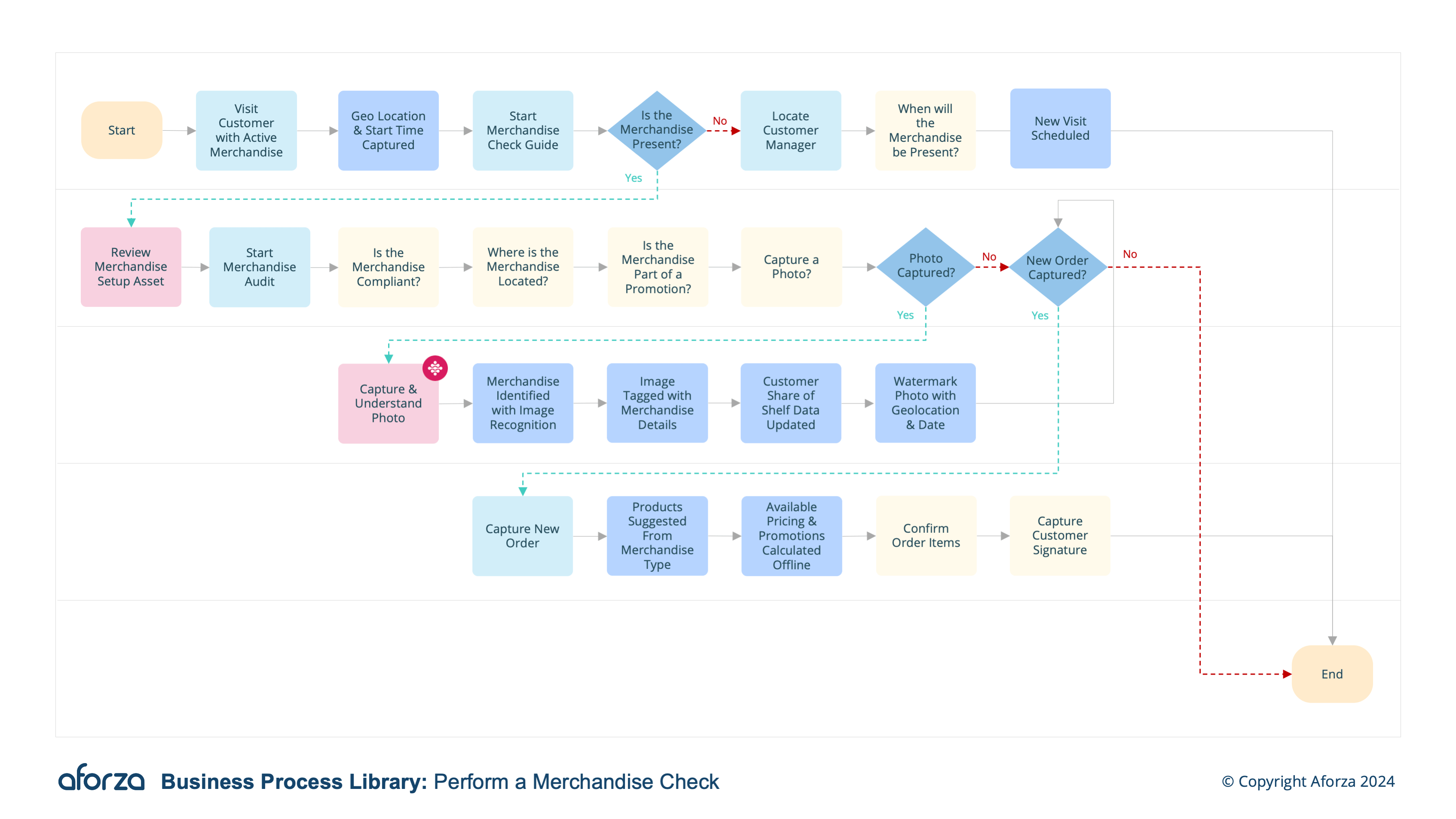
Business Process Overview
- Check into visit and confirm location: Verify the field user’s presence at the correct location.
- Start merchandising guide: Guide user with comparable planogram, details around merchandise agreement, and correct positioning.
- Capture Photo of merchandise: Watermarked with user location, time, customer and merchandise being audited.
- Capture merchandise details: Capture new merchandise audit, with compliance, location, condition, pricing and any other data needed.
- Complete Visit: Check out, stopping the visit timer and sync new data captured to HQ.
By following this process, field users ensure that products are properly positioned, compliant with agreements, and presented in optimal condition. Key insights captured include compliance status, product positioning, condition, and pricing, which are crucial for maintaining merchandising standards and enhancing the overall customer experience.

1. Check Into Visit & Confirm Location
This step is ensuring the field user is at the correct customer location.
- Verify GPS coordinates.
- Confirm check-in with timestamp.
- Validate visit agenda.
- Notify relevant parties of arrival.
- Prepare for merchandising check activities.

2. Start Merchandising Guide
This step uses the guide to ensure products are displayed correctly.
- Access the merchandising guide on the mobile device.
- Compare the current display with the planogram.
- Review merchandise agreement details.
- Ensure products are correctly positioned.
- Identify any discrepancies and prepare to address them.

3. Capture Photo of Merchandise
This step documents the display for compliance verification.
- Take a clear photo of the merchandise.
- Ensure the image includes all relevant products.
- Watermark the photo with location, time, and customer details.
- Verify the accuracy of the captured image.
- Save and upload the photo for audit purposes.

4. Capture Merchandise Details
This step records comprehensive information about the merchandise.
- Conduct a compliance check.
- Note the exact location of the products.
- Assess and document the condition of the merchandise.
- Record pricing information.
- Capture any additional data needed for the audit.

5. Complete Visit
This step finalizes the visit and syncs data with headquarters.
- Review all captured data for accuracy.
- Ensure all tasks have been completed.
- Check out to stop the visit timer.
- Sync all new data with headquarters.
- Notify stakeholders of visit completion.