

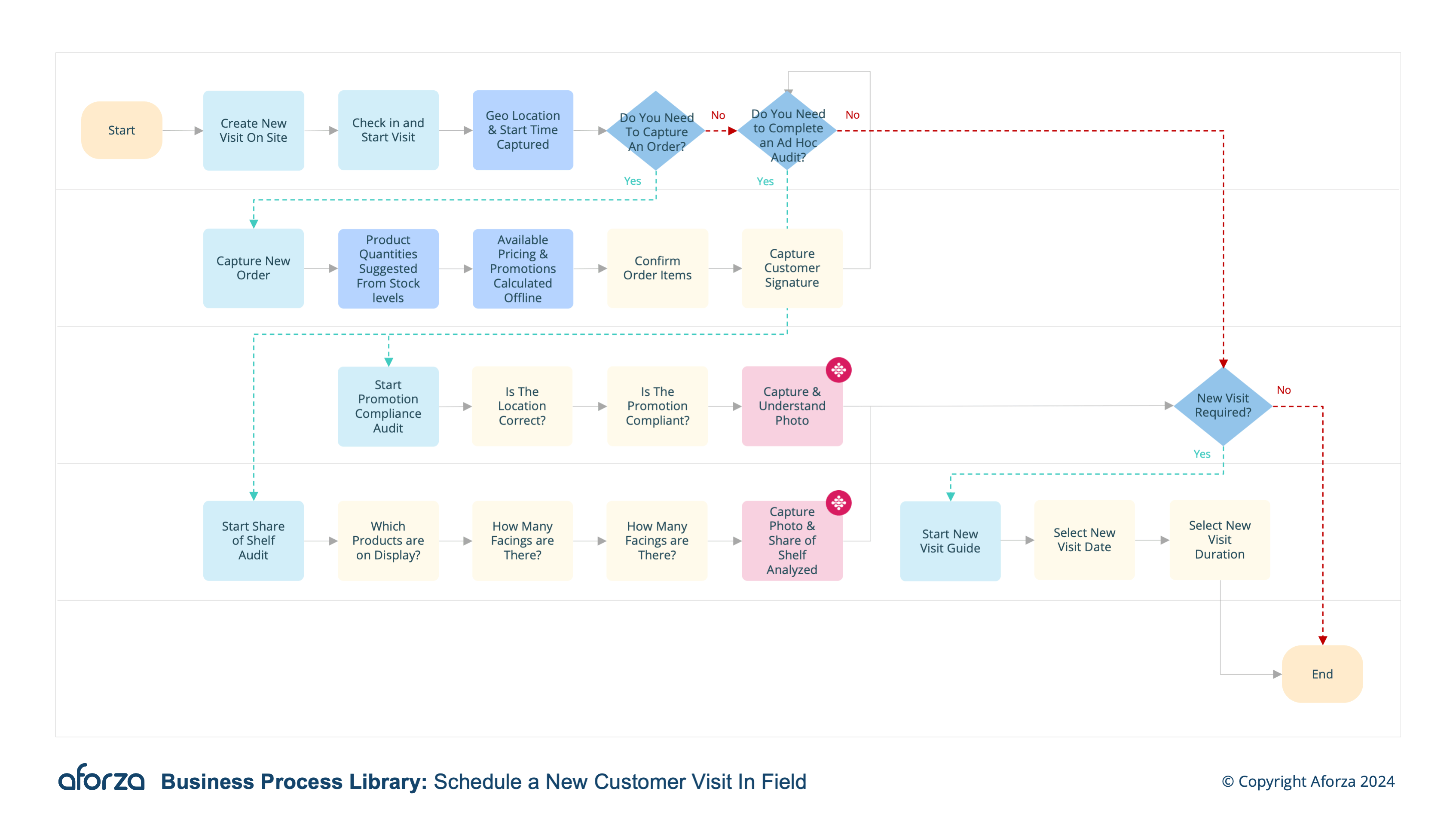
Business Process Overview
- Create visit on site: Schedule start time & check in (geolocation and start time tracked).
- Capture Order: Capture new order, with specific pricing and promotions available.
- Review tasks: Complete auto-scheduled tasks or create ad hoc.
- Complete new visit guide: Follow guided process to schedule a new visit for the customer.
- Complete Visit: Check out, stopping the visit timer and sync new data captured to HQ
This involves scheduling the visit, capturing orders with specific pricing and promotions, completing both pre-scheduled and ad hoc tasks, and following a guided process to schedule future visits. The process concludes with syncing all captured data to headquarters. This structured approach helps maintain accurate records, enhances customer service, and optimizes field operations by providing real-time data and ensuring that all tasks are completed during the visit.

1. Create Visit On-Site
This step involves scheduling the visit and checking in to ensure accurate tracking of time and location.
- Schedule the start time for the visit.
- Check in using the mobile device to log geolocation.
- Verify the customer’s location.
- Ensure the check-in time is accurately recorded.
- Confirm the visit details and proceed.

2. Capture Order
This step captures new orders, including specific pricing and promotions.
- Access the order capture interface.
- Enter the customer’s order details.
- Apply any specific pricing and available promotions.
- Review the order for accuracy.
- Save the order and confirm with the customer.

3. Review Tasks
This step involves completing auto-scheduled tasks or creating ad hoc tasks as needed.
- Review auto-scheduled tasks for the visit.
- Complete each task as required.
- Create any ad hoc tasks if necessary.
- Record the completion of each task.
- Ensure all tasks are documented accurately.

4. Complete New Visit Guide
This step guides the user through scheduling a new visit for the customer.
- Access the new visit scheduling guide.
- Follow the steps to set up a future visit.
- Select a suitable date and time for the next visit.
- Confirm the new visit details with the customer.
- Save the new visit schedule in the system.

5. Complete Visit
This step finalizes the visit and syncs data with headquarters.
- Check out using the mobile device to log the end time.
- Stop the visit timer to ensure accurate duration tracking.
- Sync all captured data with headquarters.
- Verify that all data has been successfully transmitted.
- Confirm the completion of the visit and prepare for the next task.