

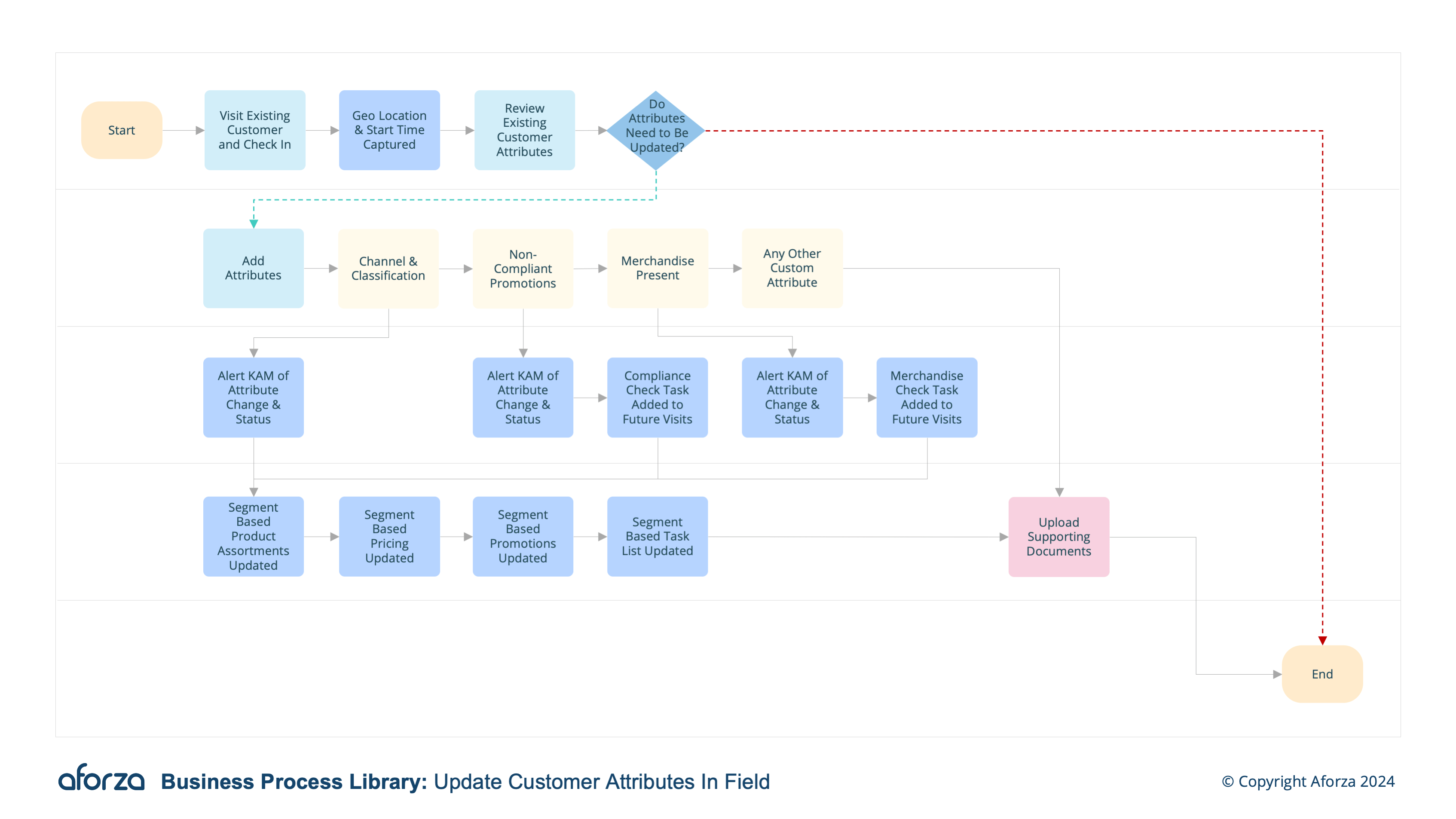
Business Process Overview
- Check in to visit and confirm location: Verify the field user’s presence at the correct location.
- Review existing account attributes: Assess current account details such as classification, status, segment and performance indicators.
- Add new attributes based on real time data: such as competitor presence, non-compliant promotions, out of stocks and identified merchandise.
- Add supporting documents (optional): Upload any relevant documents or images to support the updates.
- Complete update process: Sync the updated account attributes to HQ and automatically notify relevant stakeholders.
This process involves verifying the user’s location, reviewing existing account attributes, adding new attributes based on real-time data, uploading supporting documents, and syncing the updates with headquarters. Keeping customer account details current helps in making informed business decisions, optimizing customer interactions, and ensuring compliance with promotions and agreements. Key insights include identifying competitor presence, addressing non-compliant promotions, and managing stock levels effectively.

1. Check Into Visit & Confirm Location
This step verifies the field user’s presence at the correct location.
- Check-in to the visit using the mobile device.
- Confirm the GPS location to ensure accuracy.
- Document the time and date of the visit.
- Verify the presence of the correct customer account.
- Ensure all preliminary information is accurately recorded.

2. Review Existing Account Attributes
This step assesses current account details such as classification, status, segment, and performance indicators.
- Access the customer’s account information.
- Review the current classification and status.
- Check the customer segment and performance indicators.
- Identify any outdated or incorrect information.
- Prepare for any updates needed based on this review.

3. Add New Attributes Based on Real-Time Data
This step includes adding new attributes based on real-time data such as competitor presence, non-compliant promotions, out-of-stocks, and identified merchandise.
- Observe and record any competitor presence.
- Note any non-compliant promotions.
- Document out-of-stock items.
- Identify and record new merchandise.
- Update the account attributes with this real-time data.

4. Add Supporting Documents (Optional)
This step involves uploading relevant documents or images to support the updates.
- Capture photos as evidence.
- Upload relevant documents or images.
- Label the documents or images for clarity.
- Attach them to the corresponding account attributes.
- Verify the accuracy and relevance of the supporting documents.

5. Complete Update Process
This step ensures syncing the updated account attributes to HQ and notifying relevant stakeholders.
- Review all updated account attributes.
- Sync the updated information with headquarters.
- Automatically notify relevant stakeholders.
- Confirm that all updates have been successfully recorded.
- Ensure all data is accurately reflected in the system.