

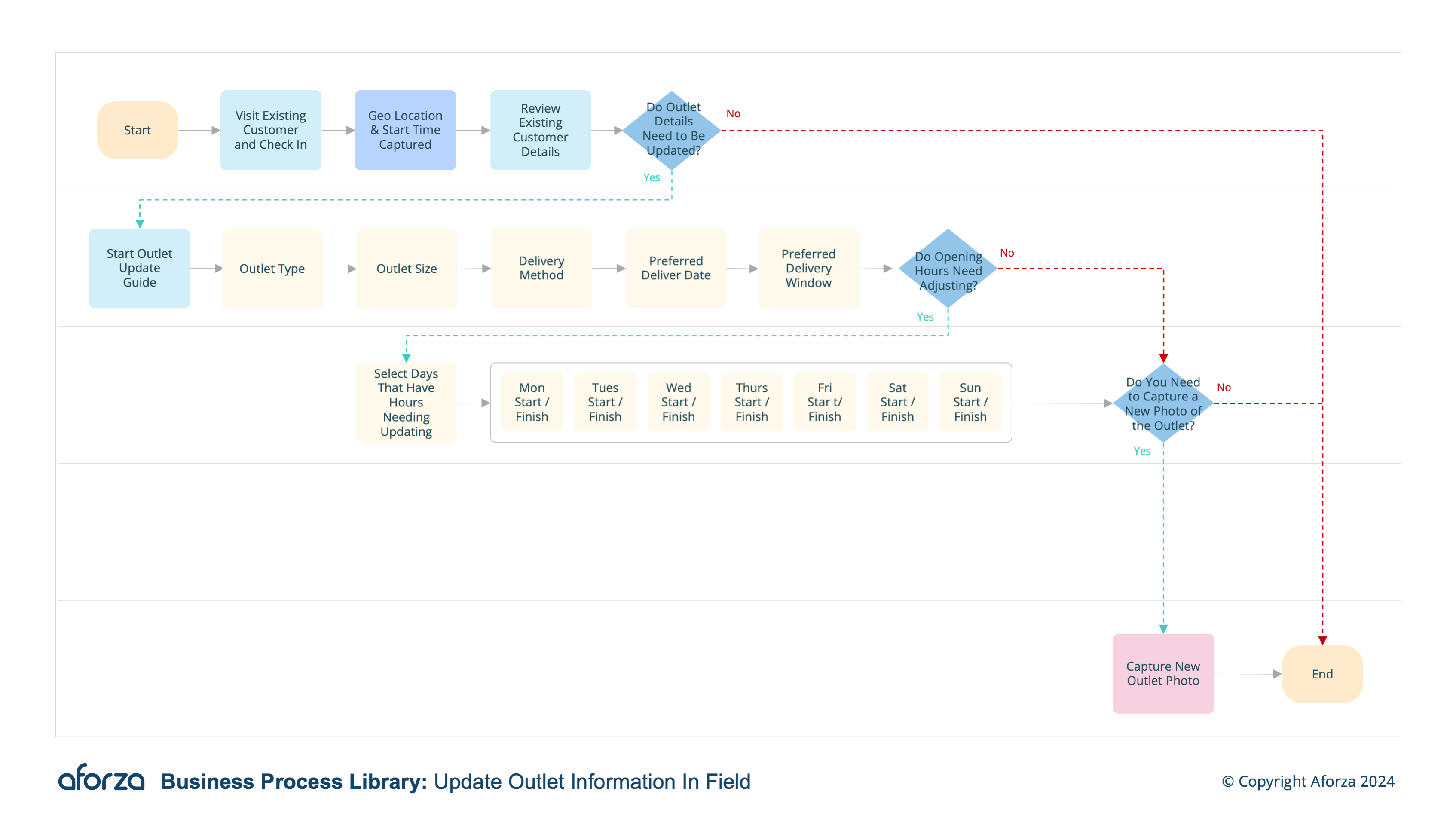
Business Process Overview
- Update Outlet Information: Select the account and determine if outlet information needs updating.
- Specify Outlet Details: Provide the outlet type, size, and adjust opening hours as needed.
- Set Opening Hours: Select the specific days and times for start and end.
- Adjust Delivery Method: Determine if the delivery method needs updating, and specify the preferred method.
- Capture Outlet Image: Capture an image of the outlet for reference if required.
This process involves selecting the account, determining the need for updates, specifying outlet details, setting opening hours, adjusting delivery methods, and optionally capturing outlet images. Keeping outlet information current helps optimize deliveries, improve merchandising efforts, and support better decision-making by providing a clear picture of the outlet’s operational context.

1. Update Outlet Information
This step starts by selecting the account and determining if the outlet information needs updating.
- Identify the customer account requiring updates.
- Review existing outlet information for accuracy.
- Confirm with the outlet manager about the need for updates.
- Prepare to gather any necessary new information.
- Ensure the correct outlet is selected for updates.

2. Specify Outlet Details
If updating, this step provides the outlet type and size.
- Access the Competitor Check Guide on the mobile device.
- Identify which competitors are present.
- Document any ongoing promotions by competitors.
- Check for the presence of competitor merchandise.
- Note the positioning and visibility of competitor products.

3. Set Opening Hours
This step selects the specific days and times for start and end.
- Review the current opening hours listed.
- Discuss any changes in opening hours with the outlet manager.
- Update the start and end times for each operating day.
- Confirm the new schedule with the manager.
- Save the updated opening hours in the system.

4. Adjust Delivery Method
This step determines if the delivery method needs updating, and specifies the preferred delivery method, day, and time window if applicable.
- Review the current delivery method in use.
- Discuss potential changes with the outlet manager.
- Specify the preferred method of delivery (e.g., direct, third-party).
- Set the preferred delivery day and time window.
- Confirm and save the updated delivery details in the system.

5. Capture Outlet Image
This step captures an image of the outlet for reference.
- Take a clear, representative photo of the outlet.
- Ensure the image captures any relevant details.
- Watermark the photo with location and time if necessary.
- Verify the accuracy of the captured image.
- Save and upload the photo for future reference.
Get Started Today
Click here to download the process flow and supporting guide. This download includes the flow that can be installed as an Aforza Guided process, along with all supporting materials to ensure successful implementation and adherence to best practices.