
What is Guided Mobile Execution?
Guided mobile execution is a structured way of running field visits from a mobile app. Instead of relying on memory or paper checklists, each user follows a guided flow of steps built around the visit type, the customer and your business rules. In sales teams this is often called guided selling; Aforza extends the same approach to service, audits and inspections, so every visit is consistent, compliant and complete.
The flow isn’t a fixed checklist; it adapts as the user works. Answers to questions decide what comes next, so extra detail is only requested when it’s needed, and steps such as a customer signature only appear when the rules call for them. The example below shows a typical guided visit: data entry, a decision point that branches or skips ahead, photo capture, an audit and a conditional sign-off, all leading to a complete, validated visit.
Built to guide the work, not just record it
Many field apps are digital forms: they capture what happened but do little to shape it. Aforza is designed the other way round. The app tells each user what to do next, checks the work as it happens and adapts the visit to the customer in front of them, so best practice becomes standard practice.
Dynamic Visit Plans
Each visit builds itself around the customer, visit type and user role, so people only see the steps that matter.
Step-by-Step Guidance
Clear prompts move users through surveys, checks, orders and photos in the right order, with nothing skipped.
Built-in Validation
Mandatory fields, logic and tolerances are checked in the moment, so data is right first time and never needs chasing.
No-Code Configuration
Business teams create and change visit templates in the back office without developers or app releases.
Inside Aforza Guided Mobile Execution
The best field teams don’t wing it; they follow a proven routine. Guided mobile execution puts that routine in every user’s hand, whether they are a rep on a store call, a technician on a service job or an assessor on an inspection.
See how a visit starts with a tailored plan, how each step guides the user and checks the work in real time, how the visit closes with a clear summary, and how business teams shape it all from the back office without writing a line of code.

Tailored visit plans
Every visit opens with a clear plan built for that customer, location and visit type.
Users see exactly which steps are required, which are optional and how long the visit should take, so they arrive prepared and spend their time on the work that matters most.
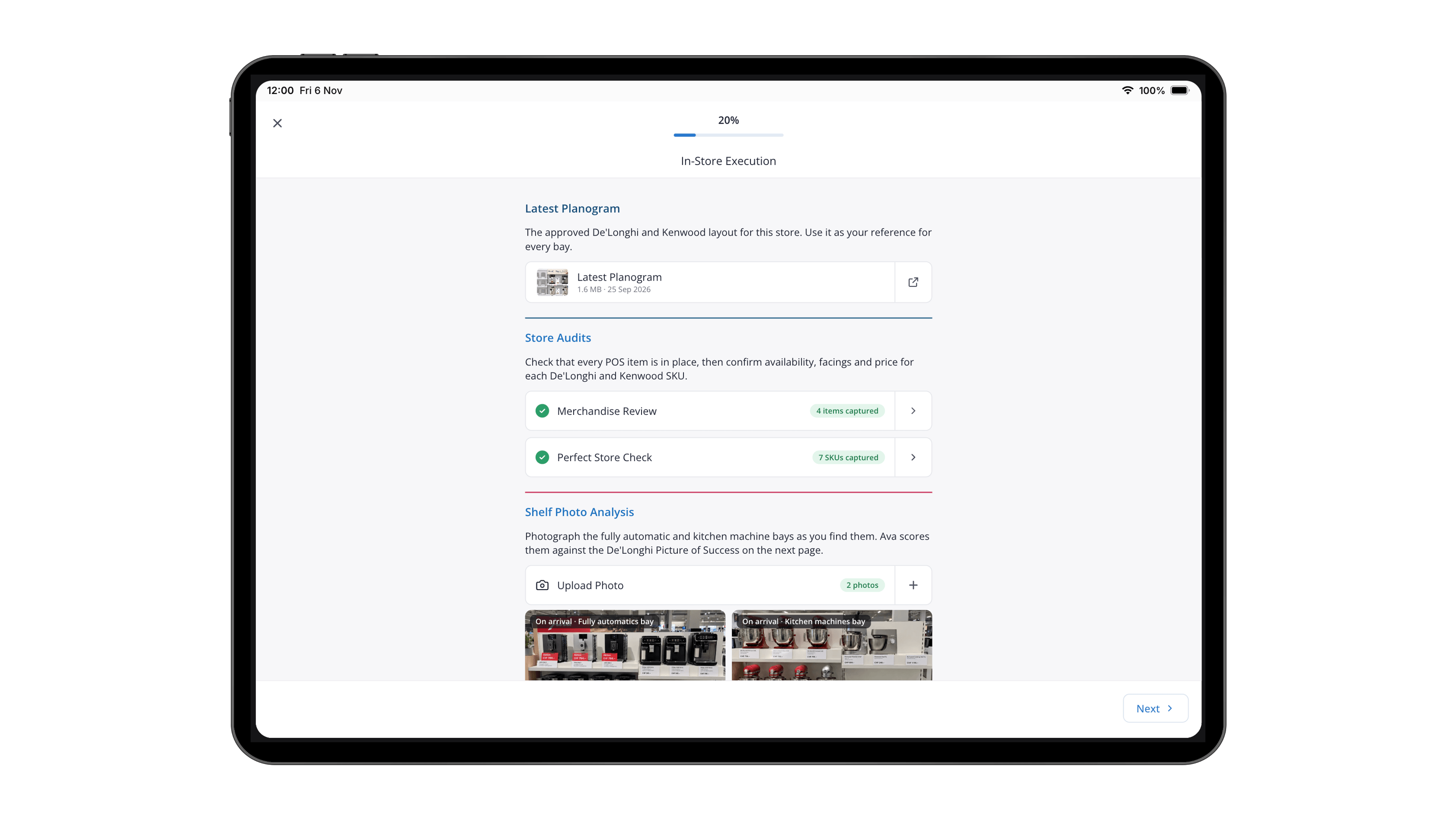
Guided steps with real-time validation
Each step walks the user through the task in hand, from surveys and safety checklists to orders and photo capture.
Mandatory fields, conditional questions and tolerance checks run as they work, catching gaps and errors in the moment so every visit produces complete, accurate data.

Multimodal input types
Every guided step can capture information in the way that best suits the task, not just through typed text.
Users can enter numbers, pick from lists, scan barcodes, take photos, record voice notes and collect signatures, all within the same flow. The right input appears at the right moment, making visits faster, data richer and evidence easier to trust.
No-code visit template builder
Business teams design and update visit templates in the Aforza back office using simple drag-and-drop configuration.
Add steps, set rules and target templates by role, customer type or region, then publish changes to the field instantly, with no developers and no app store releases.


Guide performance reporting
See how every guide is performing across the field, from completion rates and time per step to where users skip, stall or drop out.
Managers can compare results by guide, team, region or customer type, spot steps that slow visits down and see which answers trigger follow-up actions most often. Those insights feed straight back into the template builder, so guides keep improving and best practice spreads across every team.
Guidance for every kind of field work
Wherever teams visit customers, sites or assets, consistency is what separates good results from great ones. Guided mobile execution gives every user, new starter or veteran, the same proven playbook.
Consumer Goods
Reps follow guided store visits covering audits, perfect store checks, promotions and order taking.
Field service
Technicians work through guided jobs with safety checks, diagnostics and customer sign-off.
Distribution & wholesale
Route teams follow guided delivery and sales calls, from stock checks to proof of delivery.
Insurance
Assessors complete guided inspections with the right questions, photos and evidence for every claim type.

Frequently Asked Questions (FAQs)
What is the difference between guided mobile execution and guided selling?
Guided selling focuses on helping sales reps through customer visits. Guided mobile execution applies the same approach to every type of field work, including service jobs, audits and inspections, so one platform guides all your field teams.
Does guided mobile execution work offline?
Yes. Visit plans, steps, rules and validation all run on the device, so users get the same guidance with or without signal. Results sync back to Aforza automatically when a connection returns.
Can business teams change visit templates without IT?
Yes. Visit templates are configured in the Aforza back office with no code. Changes can be published to the field instantly, with no app store release required.
Can visits adapt to different customers and roles?
Yes. Templates can be targeted by role, customer type, channel or region, and conditional logic shows or hides steps based on the answers users give during the visit.
How does guided execution improve data quality?
Mandatory fields, conditional questions and tolerance checks run during the visit, so missing or inconsistent data is caught on the spot rather than chased afterwards.
Take a Tour of Aforza Guided Mobile Execution
Step into a field user’s day and see how a guided visit works from start to finish. Follow a tailored visit plan, complete guided steps with real-time checks, and watch the completed visit sync back to Aforza.