
What is Mobile Field Service?
Field service is the work done on site to install, inspect, maintain and repair equipment and assets, from coolers and dispensers in stores to machinery, building systems and property. The hardest part is rarely getting there. It’s working out what’s wrong, quickly and accurately, and fixing it without a second visit. When that depends on each technician’s experience, results vary, repeat visits pile up and costs rise.
Aforza puts your best technician’s know-how in every user’s hand. Guided triage asks the right questions to narrow down the problem, guided troubleshooting walks the user through each check and fix in order, and photos capture the condition before and after. The diagram below shows how a job moves from arrival on site, through triage and troubleshooting, to a fix, or a clean escalation with everything the next person needs.
Diagram: Answers decide the path, every fix is evidenced.
Built to fix the problem, not just log the visit
Many field service apps are digital job sheets: they record what the technician did, but leave the diagnosis to experience and guesswork. Aforza is designed the other way round. The app guides each user to the cause, shows them how to fix it and captures the evidence as they go, so every technician performs like your best one.
Guided Triage
Smart questions and checks narrow down the cause, so technicians start in the right place.
Step-by-Step Troubleshooting
Clear instructions for each fault walk users through the fix, in the right order, every time.
Photo Evidence Built In
Before, during and after photos are captured at the steps that matter, ready for customers, warranties and audits.
Realtime Action & Escalation
If a job can’t be fixed, the next person gets every answer, photo and step already completed.
Inside Aforza Field Service
First-time fix is won or lost in the first few minutes on site. A technician who starts in the wrong place wastes time, orders the wrong part or leaves the job unfinished.
Aforza Field Service gives every user a clear path from symptom to solution. See how a job opens with the asset’s full history, how guided triage narrows down the cause, how troubleshooting steps lead to the fix with photos captured along the way, and how every job closes with sign-off and a complete record.

Job and asset details on arrival
Each job opens with the asset’s details, location and service history, including previous faults, fixes and photos.
Technicians know what they’re walking into before they start, so they spend less time investigating and more time fixing.
Guided triage to find the cause
Guided questions and checks help the technician narrow down the problem, with each answer deciding what comes next.
Whether it’s a cooler not chilling, a dispenser leaking or a unit showing an error code, the app leads users to the most likely cause rather than leaving it to guesswork.

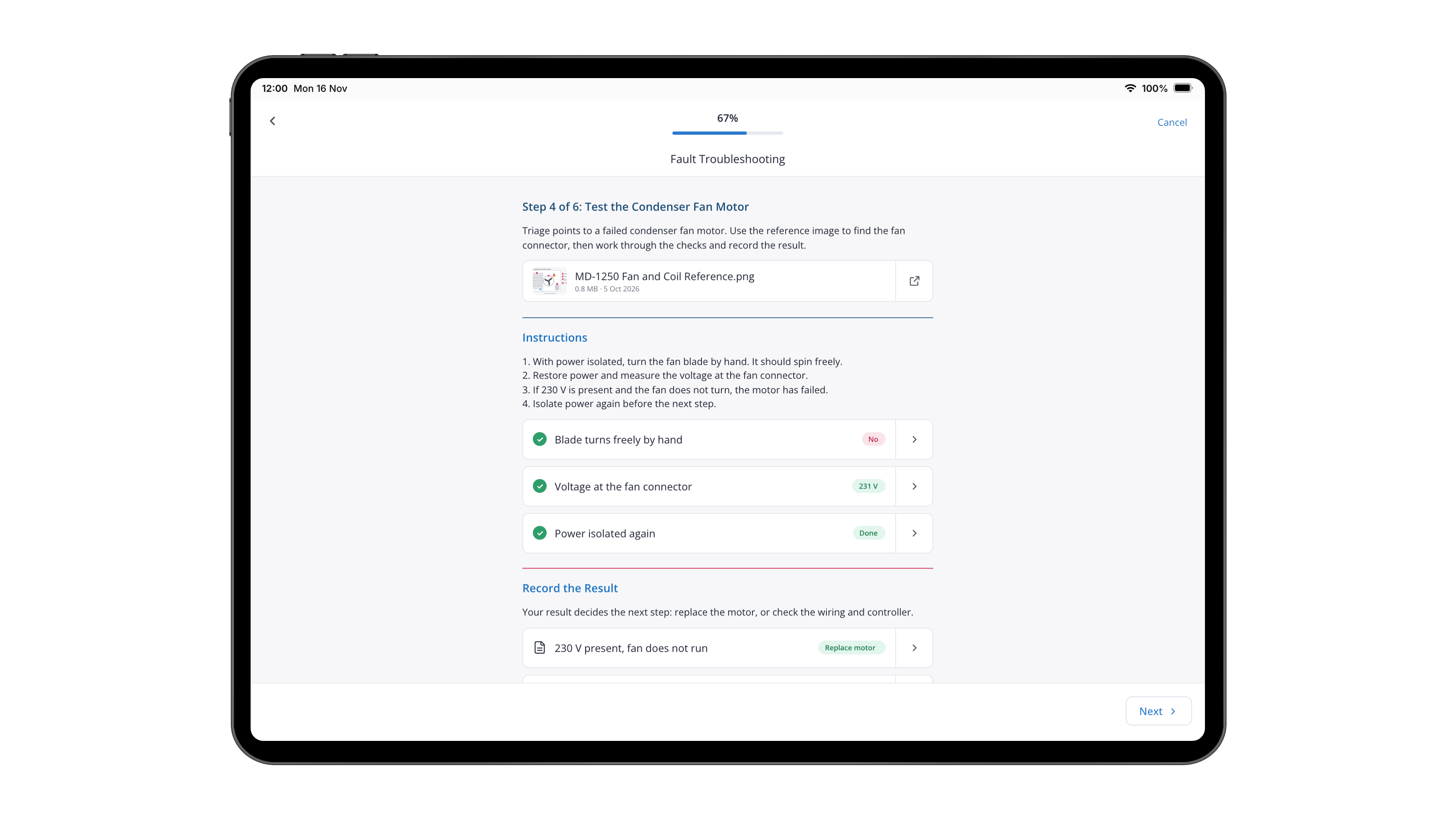
Step-by-step troubleshooting
Once the likely cause is found, the app shows clear troubleshooting steps for that fault, with instructions, checks and reference images.
Users work through each step in order, record the result and move on, so fixes are consistent across every technician and every site.
Photo capture at every key step
Photos are captured where they matter: the condition on arrival, the fault itself, parts replaced and the finished repair.
Every image is attached to the job and the asset, giving customers, warranty teams and managers clear proof of what was found and fixed.


Fix, escalate and sign off
When the job is fixed, the customer signs off on the device and a summary of the work, photos and parts used is saved straight away.
If it can’t be fixed, the job is escalated with every answer, step and photo attached, so the next visit or specialist starts where the first one left off.
Guided field service for every industry
Wherever technicians maintain and repair equipment, assets or property, getting to the cause quickly decides whether the job is fixed first time. Aforza Field Service gives every technician the same proven path.
Consumer Goods
Technicians triage and repair coolers, dispensers and point-of-sale equipment in stores, bars and restaurants, with photo proof for every visit.
Insurance
Repair networks triage home and property claims on site, follow guided repair steps and capture evidence that speeds up claim settlement.
Medical & laboratory equipment
Engineers follow guided diagnostics and service steps for regulated equipment, with a complete, evidenced service record.
HVAC & building services
Technicians troubleshoot heating, cooling and building systems using guided fault trees, cutting repeat visits.

Frequently Asked Questions (FAQs)
What is a field service app?
A field service app gives technicians the information and tools they need on site to inspect, maintain and repair equipment. Aforza adds guided triage, step-by-step troubleshooting and photo evidence, so jobs are diagnosed accurately and fixed first time.
What is guided troubleshooting?
Guided troubleshooting leads a technician through a fault step by step. Questions and checks narrow down the cause, then clear instructions show how to fix it, so results don’t depend on individual experience.
Can we build our own triage and troubleshooting flows?
Yes. Business teams build and update triage questions, fault trees and troubleshooting steps without code, and changes reach the field without an app release.
How does photo capture work during a job?
Photos are captured at the steps that matter, such as on arrival, at the fault and after the repair. Each one is attached to the job and the asset, and can be watermarked with time, location and user.
What happens if a technician can’t fix the problem?
The job is escalated with every triage answer, troubleshooting step and photo already attached, so the specialist or next visit starts with the full picture instead of starting again.
Take a Tour of Aforza Field Service
Step into a technician’s day and see how a guided job runs from start to finish. Review the asset’s history, triage the fault, follow the troubleshooting steps, capture before and after photos and watch the completed job sync back to Aforza.